In the last couple of days I wrote CardRunner, a .NET console application that lets an AI model work on a Kanban card in a WPF application. The model reads the card, changes the code, builds the application, tests the change in the running application and commits. The previous article did the same with Claude Code. This one implements the loop itself in C# with Microsoft.Extensions.AI.
CardsToLoop is a small demo app of a card-driven development loop. The source is available on GitHub →. A Kanban card describes a bug fix or a new feature in a few lines, with acceptance criteria. An agent, a large language model (LLM) that calls tools in a loop, implements the card in a real WPF application. It checks the result in the running application before it commits.
A tool is a function with a name, a description and parameters. The model calls it by name, for instance to read a file or to click a button.
In the previous article a PowerShell script passed one card to Claude Code, which chose the model, ran the loop and provided the tools for files and the shell. The same pattern runs at Peakboard in a UI test system for the Peakboard Designer. In both cases the loop itself is hidden inside Claude Code. CardRunner replaces it with about 600 lines of C#, so the loop becomes visible, with everything around it.
The demo has five parts:
- InvoiceApp, a small WPF invoice editor with three deliberate gaps, one per card
- UiMcpServer, an MCP server with eight tools that drive the InvoiceApp over Windows UI Automation
- three cards, one Markdown file per card
- run.ps1, the runner of the previous article, which starts Claude Code for one card
- CardRunner, the new runner, which runs the loop itself
The Model Context Protocol (MCP) defines how an agent lists and calls the tools of another process. UI Automation is the Windows interface that reports the controls of a window to other programs. Every control of the InvoiceApp has an AutomationId, a fixed name, and the tools of the UiMcpServer find a control by this name. So the model can enter a discount, click a button and read the total without a screenshot.
The following feature card asks for a confirmation before a row is deleted:
---
title: Deleting an item should ask first
state: New
category: Improvement
---

"Delete selected" removes the row immediately. One misplaced click and the
line is gone.

**Acceptance criteria**

- Clicking "Delete selected" with a row selected shows a confirmation dialog
  naming the item.
- "Yes" removes the row and updates the totals; "No" leaves everything as is.
- With no row selected the button does nothing, as today.
Acceptance criteria are testable conditions. The result has to meet them before the card is done. Each one names something to do in the application and the expected result. The state moves from “New” to “In Work” and then to “Done” or “Failed”.
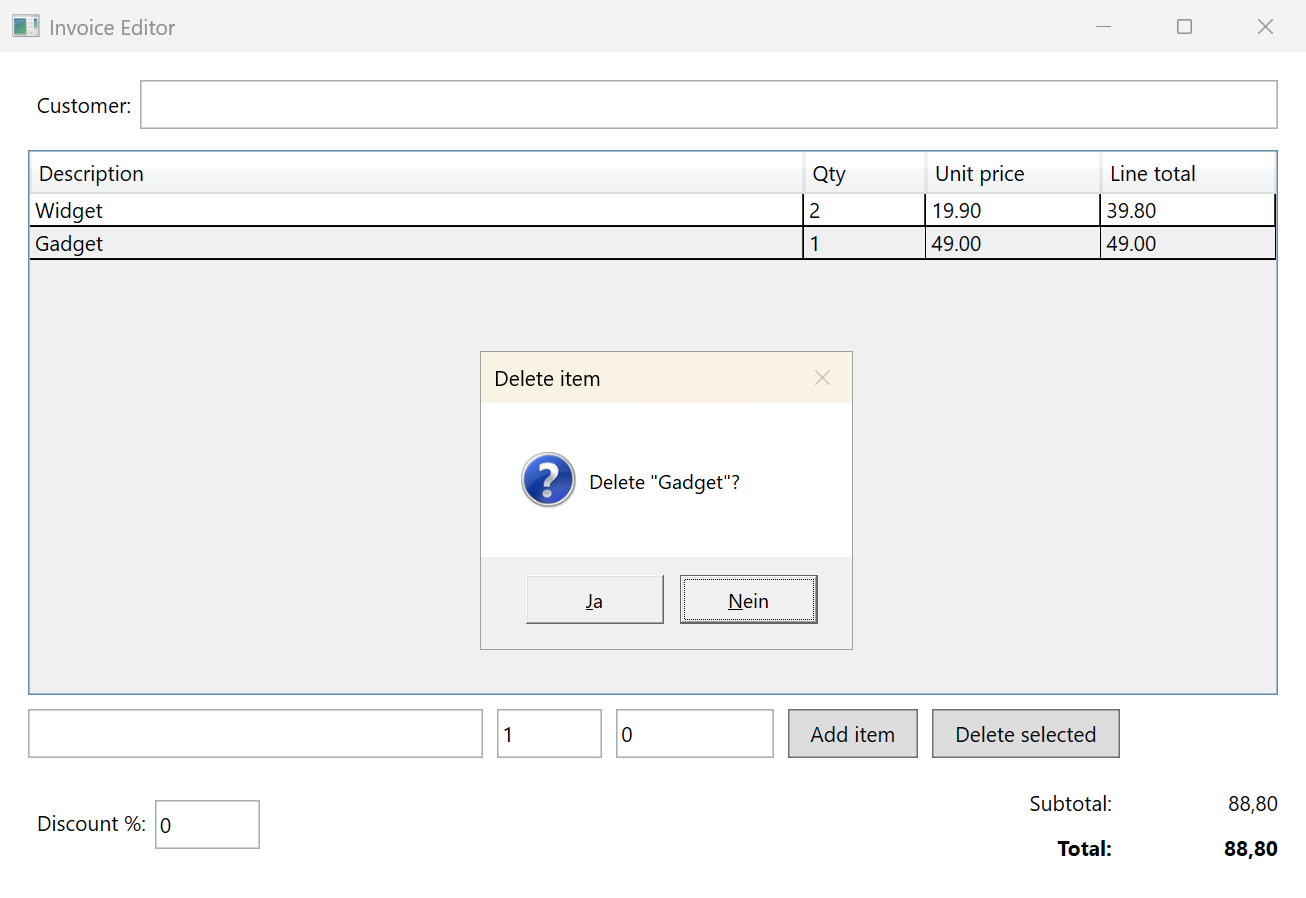
The screenshot below shows the InvoiceApp after the run of this card. The “Delete selected” button now opens a dialog with the name of the item.
This article shows how to build the loop in code and which tools the runner needs. It also covers the limits, the log and the cost of three runs.
The loop
The runner is a .NET 8 console application. It uses three packages, Microsoft.Extensions.AI 10.11.0, the MCP C# SDK ModelContextProtocol.Core 2.2.0 and the Anthropic C# SDK in version 12.58.0. Microsoft.Extensions.AI is a library from Microsoft that defines one interface for chat models and one class for tools, so the same code works with models from different providers. The interface is called IChatClient and the class AIFunction.
An LLM answers a list of messages with a new message. Without tools the answer is text. With tools the model can answer with a function call instead, the name of a tool and its arguments. This is called tool calling, or function calling.
The model cannot run anything itself. The program around it runs the tool, adds the result to the messages and calls the model again. The model reads the result and either calls the next tool or answers with text. This cycle is the agent loop, and one call of the model is a round.
The following code shows the loop written by hand with Microsoft.Extensions.AI:
static async Task<ChatResponse> RunAsync(IChatClient model, List<ChatMessage> messages, ChatOptions options, List<AIFunction> tools)
{
    while (true)
    {
        var response = await model.GetResponseAsync(messages, options);
        messages.AddMessages(response);

        var calls = response.Messages.SelectMany(m => m.Contents).OfType<FunctionCallContent>().ToList();
        if (calls.Count == 0)
            return response;

        foreach (var call in calls)
        {
            var tool = tools.First(t => t.Name == call.Name);
            var result = await tool.InvokeAsync(new AIFunctionArguments(call.Arguments));
            messages.Add(new ChatMessage(ChatRole.Tool, [new FunctionResultContent(call.CallId, result)]));
        }
    }
}
The method GetResponseAsync sends the list to the model and returns the answer, which goes into the list. If the answer holds no FunctionCallContent, the loop returns it. Otherwise the loop finds each tool by its name, runs it with InvokeAsync and adds the result as a message with the role Tool.
The list of messages grows with every round. It starts with the system prompt, the instruction for the whole run, and the card as the user message. Every answer of the model and every tool result is appended. The model sees the whole list in every round, so it knows what it has read and done. The loop ends when the model answers without a function call.
Microsoft.Extensions.AI contains this loop as a class called FunctionInvokingChatClient. The name does not appear in the code of the runner.
The call UseFunctionInvocation below adds an instance of this class to the chat client, and the lambda sets the maximum number of rounds and turns on detailed errors. When a tool throws an exception, the class sends the error message to the model as the result, so the model can try again. After three failures in a row it stops with the exception.
The following code shows the core of the runner:
var rounds = new RoundLogger(new AnthropicClient().AsIChatClient(model), log, maxTokens);

await using var uiServer = await UiServer.ConnectAsync(uiServerSetting, repoRoot);
var tools = new List<AITool>();
tools.AddRange((await uiServer.ListToolsAsync()).Select(tool => new LoggedFunction(tool, log)));
tools.AddRange(new LocalTools(repoRoot).All().Select(tool => new LoggedFunction(tool, log)));

var client = rounds.AsBuilder()
    .UseFunctionInvocation(configure: options =>
    {
        options.MaximumIterationsPerRequest = maxIterations;
        options.IncludeDetailedErrors = true;
    })
    .Build();

var messages = new List<ChatMessage>
{
    new(ChatRole.System, File.ReadAllText(Path.Combine(AppContext.BaseDirectory, "instructions.md"))),
    new(ChatRole.User, "THE CARD\n--------\n" + card.Text),
};

var response = await client.GetResponseAsync(messages, new ChatOptions { Tools = tools, MaxOutputTokens = 4096 });
var result = ResultContract.Parse(response.Text);
The first line creates the chat client for Claude. The method AsIChatClient is part of the Anthropic SDK. The OpenAI package offers the same method, so an OpenAI model needs only a different first line. The class RoundLogger → wraps the client and counts rounds and tokens. A token is a piece of text of about four characters, and the API bills the input and the output of every round per token.
The next block connects the UiMcpServer and puts its eight UI tools and the seven local tools into one list. The call UseFunctionInvocation adds the loop with a limit of 60 rounds. The messages are the system prompt from a file and the card as the user message. Then the method GetResponseAsync runs until the model answers with text. The last RESULT line of this text decides the state of the card, as in the PowerShell runner.
The class UiServer wraps the McpClient of the MCP C# SDK, which starts the UiMcpServer as a child process and talks to it over standard input and output. The method ListToolsAsync returns the eight tools as AIFunctions, so they go into the same list as the local tools. The model does not see a difference.
The tools
Claude Code provides its own tools for files and a shell. The runner has to provide them, and it does so with fixed commands instead of a shell. The seven local tools are:
- list_files for the files under a folder of the repository
- read_file for a file under src or .claude/rules
- write_file for a file under src/InvoiceApp, always with the complete content
- build_app for dotnet build of the InvoiceApp
- start_app and stop_app for the process of the InvoiceApp
- git_commit for the commit of the changes under src/InvoiceApp
The model can call only these tools. There is no way to call another program or to write outside the application folder. The runner checks every path against the allowed folders first. A limit that the code enforces is called a guardrail. The following code shows the build tool from the class LocalTools →:
[Description("Builds src/InvoiceApp with dotnet build. Call stop_app first, the build fails while the exe runs. Returns the errors and warnings of the build.")]
public async Task<string> BuildAppAsync()
{
    var (exitCode, output) = await RunAsync("dotnet", $"build {AppProject}", BuildTimeoutMs);
    var lines = output.Split('\n').Select(line => line.TrimEnd()).Where(line => line.Length > 0).ToList();
    var relevant = lines.Where(line => line.Contains("error", StringComparison.OrdinalIgnoreCase)
        || line.Contains("warning", StringComparison.OrdinalIgnoreCase));
    var summary = exitCode == 0 ? "Build succeeded." : $"Build failed with exit code {exitCode}.";
    return summary + "\n" + string.Join("\n", relevant.Distinct().Take(BuildOutputLines));
}
The method AIFunctionFactory.Create turns this method into an AIFunction with a description of its parameters in JSON. The Description attribute tells the model when to call the tool and what to do first. The tool returns one summary line and the errors and warnings, not the full output of MSBuild. The full output costs tokens in every later round. Context engineering means deciding what the model sees in a call, and how much.
A class called LoggedFunction → wraps every UI tool and every local tool. It writes the call with its arguments, duration and result to the log. Then it converts the result to plain text and cuts a result above 4,000 characters. The result ends with a note about the cut. So the model can ask for less next time, for instance for the elements of one window instead of all windows.
The first run showed why the plain text matters. The MCP client returns a text block as an object, and the model saw a JSON object with escaped quotes and line breaks. The escaped characters cost tokens in every later round.
The prompt, the limits and the log
The system prompt is the prompt of the PowerShell runner with a few changes. The tool names replace the shell commands, and one line says: “There is no shell. If something is not possible with these tools, say so in the RESULT line.” The card is the user message. The following text shows the steps of the system prompt in instructions.md →:
HOW TO WORK
-----------
1. Start the app with start_app, reproduce or inspect the behavior the card
   describes using the ui_* tools. Take a screenshot as evidence.
2. Implement the change in src/InvoiceApp. Keep it minimal and in the style of
   the existing code.
3. Stop the app with stop_app BEFORE rebuilding - the build fails while the exe
   runs. Rebuild with build_app.
4. Start the app again and verify every acceptance criterion of the card live
   through the ui_* tools: change values, click, read the results back.
   Take an after screenshot. A build that compiles proves nothing.
5. Stop the app. Commit ONLY the source changes with git_commit; the tool stages
   src/InvoiceApp and nothing else. The first line of the message is:
   card: <the card title>
   and the body says in two or three sentences what was changed and how it
   was verified live.

THE LAST LINE of your final message must be exactly one of:
RESULT: done
RESULT: failed: <one-line reason>
The fourth step ends with the sentence “A build that compiles proves nothing.” The last line of the final answer has to be RESULT: done or RESULT: failed with a reason. The runner reads this line and sets the card to “Done” or “Failed”.
Two limits end a run that does not stop on its own. The loop stops after 60 rounds, and RoundLogger stops it after 400,000 tokens. RoundLogger sits below the loop, so it sees each call to the model. The input of a round is the whole conversation so far, so the total of the input tokens grows with every round.
A run that stops at a limit leaves the card as “Failed”. My first run failed before the first round. The model “claude-sonnet-5-5” does not accept the temperature parameter, so the runner sends none.
Every run writes a log file with one JSON object per line. The first line is the start with the tool list. Then a line follows for each round, for each tool call and for the final result. The following two lines show the first round and the first tool call from the run of the delete card:
{"time":"11:55:09.301","type":"round","data":{"round":1,"ms":2074,"inputTokens":3270,"outputTokens":76,"calls":["list_files","list_files"],"text":""}}
{"time":"11:55:09.312","type":"tool","data":{"name":"list_files","arguments":{},"ms":5,"result":"src/InvoiceApp/App.xaml\nsrc/InvoiceApp/App.xaml.cs\nsrc/InvoiceApp/InvoiceApp.csproj\nsrc/InvoiceApp/MainWindow.xaml\nsrc/InvoiceApp/MainWindow.xaml.cs\nsrc/InvoiceApp/OrderItem.cs"}}
The first round took 2 seconds and used 3,270 input tokens, and the model asked for the file list twice. The tool call took 5 ms and returned six file names. The log is the complete record of the run. Claude Code writes a similar log with its stream-json output format.
Three cards, three runs
I ran each of the three cards once with the model “claude-sonnet-5-5”:
- total-ignores-the-discount: 15 rounds, 31 tool calls, 194,000 input tokens, 47 seconds
- delete-asks-for-confirmation: 20 rounds, 34 tool calls, 255,000 input tokens, 59 seconds
- validate-quantity-and-price: 21 rounds, 40 tool calls, 327,000 input tokens, 68 seconds
All three runs ended with RESULT: done and a commit of one file. The three runs follow the same pattern. The model lists the files twice, reads five or six of them, writes one file and builds once. It starts and stops the application twice, takes two screenshots and commits once. An LLM is non-deterministic, so a second run of the same card can take other steps.
The calls to the model take about 80 percent of the duration. The rest is the build and the start of the application. In the repository the tags with the suffix “-dotnet-done” mark the state after each run. The main branch still contains the three gaps, so every card can run again.
The delete card from the beginning asked for a confirmation dialog that names the item. The model added a message box with the buttons Yes and No, checked both in the running application and committed (see screenshot above).
On a German version of Windows the buttons of this dialog are labeled Ja and Nein. The first attempt of the model to find a window called Delete item failed because the dialog belongs to the main window. The model then listed the elements of the main window, found the two buttons by their AutomationIds 6 and 7 and clicked them. Both checks passed.
The commit message of the validate card says “88,70” where the subtotal was 88,80. The code is right, but the text is not. An answer that sounds right and is wrong is called a hallucination.
With Claude Code the discount card took 200 seconds. Claude Code chooses its own model and provides more tools, so the two numbers are not comparable. Claude Code also has features the runner does not have:
- shortening of the conversation when it exceeds the context window, the maximum number of tokens the model reads in one call (the runner stops at the token limit)
- resuming a run with its conversation, called session continuation
- subagents, a second agent that the first one starts with a task
- a permission step, so a human in the loop approves the commit
- agent memory, notes the model writes for later runs
This article does not cover the Microsoft Agent Framework, which adds sessions, checkpoints and tool approval on top of Microsoft.Extensions.AI. It also does not show how to run the runner in a container. With an HTTP address instead of a program path the runner connects to a UiMcpServer on another machine. The server already supports Streamable HTTP. But UI Automation needs a desktop with a logged-in user, so the application under test stays outside the container.
That’s it.
If you have questions feel free to contact me.
Links:
CardsToLoop on GitHub →
Microsoft.Extensions.AI →
MCP C# SDK →
Anthropic C# SDK →
Microsoft Agent Framework →
UI Automation overview →