In March 2026 work started on a test system for the Peakboard Designer, a Windows Presentation Foundation (WPF) application. An AI agent, Claude Code, operates the user interface (UI) through Windows UI Automation like a human tester, judges the result and reports every bug it finds. Everything that has to be repeated runs without a model. A separate runner executes JSON test scripts.
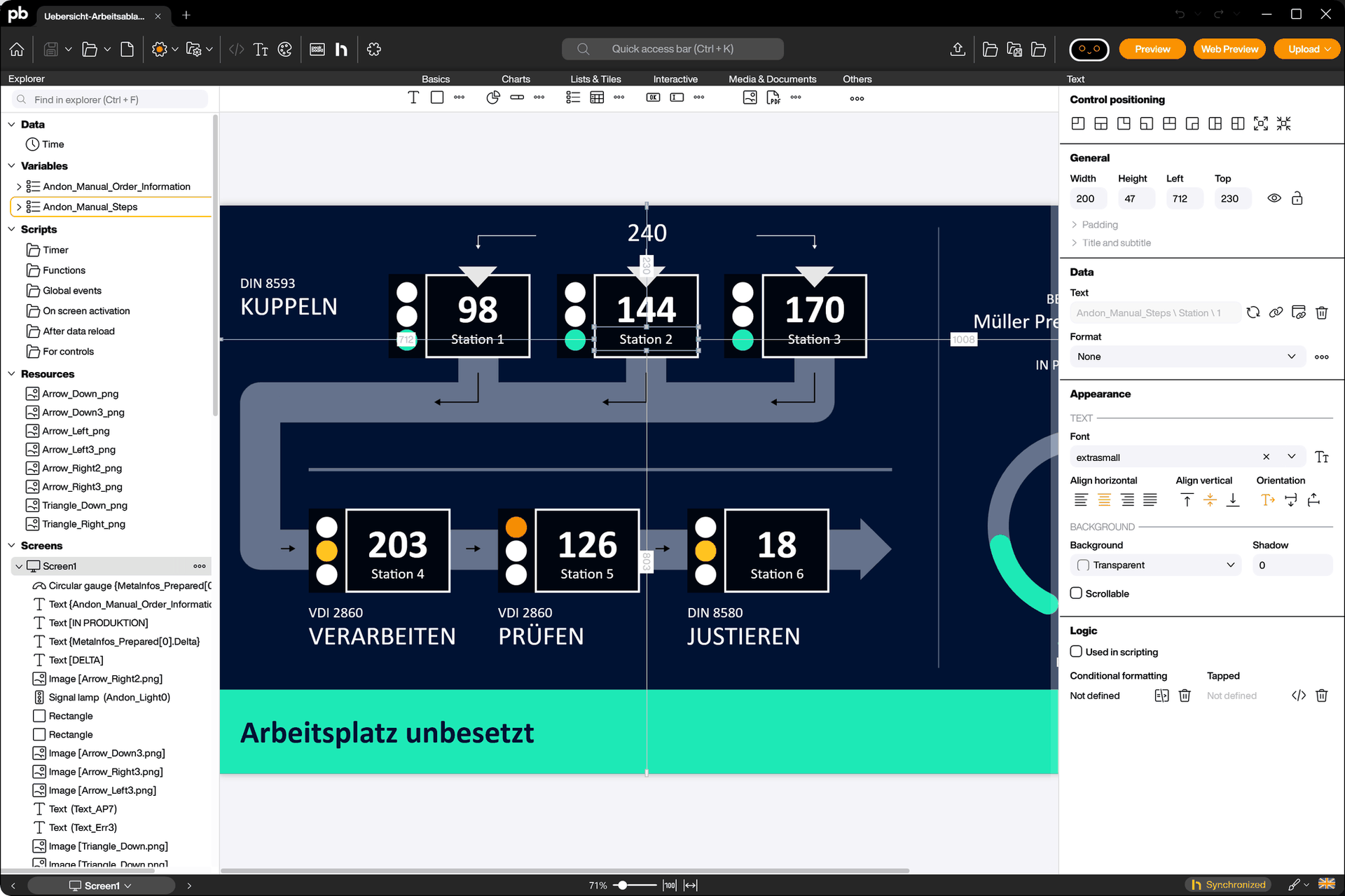
The Peakboard Designer is the editor for Peakboard boards, with a canvas, a toolbox, property dialogs and its own project file format. The screenshot below shows a board with six stations on the canvas and the properties of a text control on the right.
The test system is internal tooling and not part of the product. The Designer is the application under test.
The idea
Agentic means that the model calls a tool, reads the result and decides the next step on its own. The model does everything that needs understanding. It explores an unknown dialog, chooses the next click, checks if a value is right and writes the bug report. A runner without a model does everything that has to be repeated in the same way every time, for instance a nightly regression suite.
There is no model call in the code of the system. Claude Code runs as a process, gets a prompt and a set of tools, and the rest is .NET, Markdown and JSON.
The diagram below shows the parts and the connections between them.
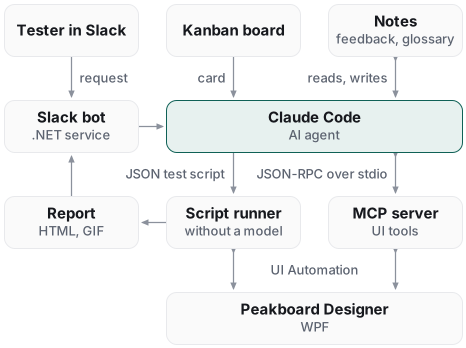
A tester writes a request in Slack. A bot starts Claude Code with a command and the request as text. A card on a Kanban board starts Claude Code as well. Claude Code starts the MCP server as a child process, reads its notes and drives the application through the tools of the server.
When a flow has to be repeated later, Claude Code writes a JSON test script and starts the runner. Report and findings go to Slack. The agent adds the new lessons to its notes.
The MCP server
The Model Context Protocol (MCP) is the open standard a model uses to call tools in another program. The server is a .NET 8 console process. Claude Code starts it as a child process and sends JSON-RPC messages over stdin. The answers return over stdout, one message per line.
The server implements three methods, initialize, tools/list and tools/call. The message loop is hand-written without a software development kit (SDK), because the protocol is small. The server offers more than 30 tools in four groups:
- Reading tools for the UI tree, one element, its text or a property, and the list of open windows
- Action tools for click, double click, right click, hover, typing, key strokes, list selection and drag and drop
- Assertion tools for exists, visible, enabled, value and text
- Tools for waiting, screenshots, video recording, building the application and committing to Git
The tools use System.Windows.Automation, the managed UI Automation API of .NET. The library FlaUI is available as a second backend through an environment variable. FlaUI uses the newer UI Automation interface, which is based on the Component Object Model (COM). The element search tries the AutomationId first and then the Name. The AutomationId is a fixed id that the developer sets on a control.
The model never sees images and never sees whole trees. That is the central decision of the design. On request, a click returns a diff of the tree, the elements that appeared, disappeared or changed, at most 30 of each. It also returns a report of the windows that opened or closed. The following JSON shows the answer to a click on the File menu:
{ "success": true, "automationId": "MainMenu_File", "executionMs": 2840,
  "diff": { "appeared": ["FileMenu_New", "FileMenu_Open"], "disappeared": [], "changed": [] },
  "activeDialog": null, "windows": { "count": 1, "opened": [], "closed": [] } }
The field executionMs holds the response time in milliseconds. The value is high because the diff was switched on for this click. The field activeDialog is null because the click opened no dialog.
The diff needs two snapshots of the tree and raises the response time from about 200 to about 3000 milliseconds. So the diff is off by default, and the model enables it with a parameter when it needs the changes of a click. The tool description tells the model both numbers.
The window report is always there. The model must never miss a new dialog. Full trees and screenshots go to disk. The tool returns the file path, never the content.
The agent is a set of Markdown files
There is no AI code in the repository. The agent is Claude Code with Markdown prompts. A role is a command, a Markdown file with instructions. Claude Code loads it when the prompt starts with its name. The test role is the command /test. Further roles write a concept, implement a task or write documentation.
The test prompt is a router of about 250 lines. It holds two principles, five rules and the format of the result line. The principles override every other rule. The details live in reference files. Claude Code reads a reference only when the task needs it, for instance the memory protocol, bug hunting, live testing or script authoring.
The first principle is live first. The default is to drive the application through the MCP tools and to look at the result after every step. A JSON test script is written only when replay is the point, for a nightly run, a regression suite or a permanent reproduction of a bug.
The second principle is memory first. The agent reads its notes before the first click. When a step fails, it searches the notes for the symptom instead of repeating the call.
Five rules decide the quality of a run:
- A round trip for every value, change it to a non-default value, save, reopen, read it again
- No guessed AutomationIds, only the live tree
- A lookup in the notes on every failure instead of a retry
- A fix in the source for a missing AutomationId instead of a workaround
- A finding for every bug in the application, even when the test passes
The first rule comes from a bug. A port number in a connection dialog returned to its default value after saving and reopening the file. The test found the bug only because it used a non-default value, saved, reopened and checked the stored value. Without one of these four steps the bug is invisible.
Memory, feedback and glossary
Claude Code starts every run without context. Without notes the agent has to find every known problem of the application again on every run. The notes are Markdown files in the repository, around a thousand by now.
A router file lists about 30 topics with one line each. A topic file lists its notes with one line each and links to the neighboring topics. The agent reads the router, opens one to three topics and follows at most one link. When something fails, it searches the notes by symptom, for instance “value reverts”, not by feature.
There are three kinds of notes. An error note holds a failure, its cause and the step that works. A workflow note holds a verified sequence of steps. A verify note holds the verdict on a feature or a task.
One error note is about a combo box. Pressing Enter in the combo box closed the whole dialog, because WPF sends the Enter key to the default button of the dialog. The note says to press the Down key to accept the autocompletion and then to click the OK button.
Feedback is the second store. It holds two dozen rules from people. A rule is set from Slack with a message that starts with “remember”. Every rule has a scope, for instance test or documentation. Every run reads the rules, applies them and names the numbers of the rules it applied in its report.
The glossary is the third store. It holds the allowed terms with a definition and the wrong terms with their replacement, per language. Every role reads it before it writes text for people, for instance a bug report or a help article.
The script runner
The runner is a console program that executes JSON test scripts. It shares code with the MCP server, for instance the element search and the click code. The model drives the application live. The runner executes the same actions from a script, with the same code.
A script has a setup, steps, a teardown, variables, imports and invariants. There are twelve step types, for instance action, assert, wait_for, store, if, for_each and run for a sub script. A schema file defines the format. An unknown step kind is rejected when the script is loaded.
An action may declare the elements that must appear or disappear in the tree. Without that, a double click on a toolbox icon that does nothing is a passed step. With it, the step fails.
After every step the runner runs seven automatic checks, called test oracles. An oracle checks the state of the application, independent of the step itself. The seven oracles detect the following cases:
- The process of the application has exited
- A window does not answer a message within a timeout
- A new window appeared, reported by a WinEvent hook, even when it closed again
- A new window appeared, found by polling when the hook fails
- An error label is visible in the window
- The log file of the application has new error lines
- The Windows application event log has new entries from the application
A crash dialog is recognized by its content, not by its title. The WPF dialog for an unhandled exception carries the normal title of the application. So the runner reads the text of a new window. It searches for an exception type, a stack trace line or the two buttons to continue or quit.
The runner writes an HTML report with a table of steps and screenshots, a GIF from the screenshots and a row in a SQLite database. Every finding gets a fingerprint, a hash over the oracle name, the normalized title and the first stack trace line. So a crash that ten scripts find is one problem, not ten.
There is also a random walk. An operations file lists four operations that leave the application in the same state, for instance create a text block and undo. A generator draws 40 of them with a seed and writes a normal script. Three walks run every night. A crash from the night is reproducible with the seed.
Missing AutomationIds
UI Automation finds an element through its AutomationId, which the developer sets in the Extensible Application Markup Language (XAML). Without it only the name or a coordinate is left. The test prompt forbids both and treats a missing id as a bug in the application.
The fix is a second agent. A tool of the MCP server returns a ready-made task text. The main agent starts a subagent with that text. The subagent has no UI tools, only file tools. It finds the element in the XAML or C# source, adds the AutomationId with a name built from area, control type and purpose, and changes nothing else.
The limit is 50 elements per run. Then the main agent builds the application with the build tool, checks the new ids in the live tree, writes a note and commits.
Slack and the Kanban board
A bot connects Slack to the test machine. It is a .NET service with the SlackNet library in Socket Mode, so it needs no public endpoint. The bot contains no model. It checks an allowlist and reads the first word of the message. Then it starts Claude Code in headless mode with the command and the request text, and reads the output as a JSON stream.
The bot reads the stream and posts the new tool calls and messages of the agent to Slack every four seconds. It also reads the session id from the stream. The last line of a run is a result line with the path of the HTML report or an error text. The bot uploads the report and the GIF and remembers the session id per channel.
A later message in the same channel continues the same session with the resume flag. So a tester can ask a question about step 12 and get an answer with the full context of the run.
Only one run executes at a time, because only one instance of the application can run on the desktop. Further requests wait in a queue. The bot runs as a scheduled task at logon, not as a Windows service, because UI Automation needs an interactive desktop.
In July 2026 the Kanban board became the second way to start a run. A card is a task. A run is one start of Claude Code for a card in one role. Developing and testing are two separate runs. The test run does not assume that the development run checked anything. The test prompt says it in one line: a card that has just been developed is untested.
Limits
In live mode no oracle runs, so only the agent can notice a bug. The random walk has four operations. Sessions are kept per Slack channel, not per thread, and only in the memory of the bot process. A restart of the bot forgets them. There is no retrieval over embeddings, no fine-tuning and no separate model call. The notes are read with a router and grep.
That’s it.
If you have questions feel free to contact me.
Links:
Model Context Protocol →
Claude Code, run programmatically →
Claude Code, skills and commands →
Claude Code, subagents →
UI Automation overview →
FlaUI →
SlackNet →