In September 2026 I wrote CardsToLoop, a small demo of a card-driven development loop for a WPF application. A Kanban card describes a bug fix or a new feature, and Claude Code implements it. For a desktop application a successful build proves nothing. The agent has to start the application, use it and check the result itself.
This article shows how to connect Claude Code with a small MCP server for Windows UI Automation and a PowerShell runner. The runner gives the agent one card, and the agent works on it until it commits the change. It is the same pattern as in the agentic UI test system for the Peakboard Designer, in about 700 lines.
The application and the cards
The demo has four parts:
- InvoiceApp, a small WPF invoice editor with three deliberate gaps
- UiMcpServer, an MCP server with eight tools for Windows UI Automation
- three cards, one Markdown file per card
- run.ps1, the runner that starts Claude Code for one card
The InvoiceApp is a simplified example with a simple user interface. It only exists to show the principle of the technique. Every control of the InvoiceApp has an AutomationId. An AutomationId is a fixed name of a control that UI Automation reports to other programs. The agent uses it to find the Discount % text box or the total without a screenshot. The following XAML shows the Discount % text box:
<TextBox x:Name="DiscountTextBox"
         AutomationProperties.AutomationId="DiscountTextBox"
         Width="60" Height="28" VerticalContentAlignment="Center" Text="0"
         TextChanged="DiscountTextBox_TextChanged"/>
The attribute AutomationProperties.AutomationId sets the AutomationId. The agent passes this value to the tools of the MCP server to address the text box.
A card is a Markdown file with a title, a state, a description and acceptance criteria. Acceptance criteria are testable conditions that the result has to meet before the card is done. The state moves from “New” to “In Work” and then to “Done” or “Failed”. See the example in the section “A bug fix card” below.
The MCP server
The Model Context Protocol (MCP) defines how an agent calls the tools of another process. UiMcpServer is a .NET 8 console application with the ModelContextProtocol package in version 2.2.0. It offers the following tools:
- ui_list_windows for the visible top-level windows
- ui_find_elements for all elements of a window with an AutomationId or a name
- ui_click for a click on an element
- ui_set_text for writing the text of a text box
- ui_get_text for reading the text of an element
- ui_select_row for the selection of a row in a list or grid
- ui_wait_for for waiting until an element exists
- ui_screenshot for a PNG screenshot of the window
Every tool addresses a window by a part of its title and an element by its AutomationId. If no element has this AutomationId, the tool searches by name. So the buttons of a system dialog stay reachable, because they have a caption but no AutomationId.
The following code shows the tool that sets the text of a text box:
[McpServerTool(Name = "ui_set_text")]
[Description("Replaces the text of a text box via the Value pattern.")]
public static string SetText(
    [Description("Title fragment of the window")] string windowTitle,
    [Description("AutomationId or Name of the element")] string target,
    [Description("The new text")] string text)
{
    var element = FindTarget(FindWindow(windowTitle), target);
    if (!element.TryGetCurrentPattern(ValuePattern.Pattern, out var value))
    {
        throw new McpException($"'{target}' does not support the Value pattern.");
    }
    ((ValuePattern)value).SetValue(text);
    return Ok($"set '{target}' to \"{text}\"");
}
The McpServerTool attribute registers the method under the name ui_set_text. The Description attributes are part of the prompt. Claude Code sends them to the model, and the model decides from them which tool to call with which values. The Value pattern is the UI Automation interface for controls with a text value. The click tool tries the Invoke, SelectionItem and Toggle patterns first and sends a real mouse click only as the last step.
A file called .mcp.json in the repository tells Claude Code how to start the server:
{
  "mcpServers": {
    "ui": {
      "command": "src/UiMcpServer/bin/Debug/net8.0-windows/UiMcpServer.exe",
      "args": []
    }
  }
}
Claude Code starts the server as a child process and talks to it over standard input and output. Each message is one line of JSON-RPC. The following two lines show a call of ui_set_text and the answer of the server:
{"jsonrpc":"2.0","id":2,"method":"tools/call","params":{"name":"ui_set_text","arguments":{"windowTitle":"Invoice Editor","target":"DiscountTextBox","text":"10"}}}
{"jsonrpc":"2.0","id":2,"result":{"content":[{"type":"text","text":"{\"ok\":true,\"message\":\"set 'DiscountTextBox' to \\\"10\\\"\"}"}]}}
Before the first call Claude Code sends initialize with the protocol version and then tools/list. The answer to tools/list contains the name, the description and a JSON schema of the parameters of every tool. The SDK creates the schema from the method and its attributes.
The runner
The runner sets the card to “In Work”, builds the prompt and starts Claude Code in non-interactive mode. The prompt contains the card, the paths of the project and five steps. The following text shows the template, and the runner inserts the card at $cardText:
You are working one card of a card-driven development loop in this repository.

THE CARD
--------
$cardText

THE PRODUCT
-----------
- WPF app: src/InvoiceApp (project src/InvoiceApp/InvoiceApp.csproj)
- Built exe: src/InvoiceApp/bin/Debug/net8.0-windows/InvoiceApp.exe
- Every control has an AutomationId; discover them with ui_find_elements.

HOW TO WORK
-----------
1. Start the app (Start-Process the exe), reproduce or inspect the behavior the
   card describes using the ui_* MCP tools. Take a screenshot as evidence.
2. Implement the change in src/InvoiceApp. Keep it minimal and in the style of
   the existing code.
3. Stop the app (taskkill /IM InvoiceApp.exe /F) BEFORE rebuilding - the build
   fails while the exe runs. Rebuild with: dotnet build src/InvoiceApp/InvoiceApp.csproj
4. Start the app again and verify every acceptance criterion of the card live
   through the ui_* tools: change values, click, read the results back.
   Take an after screenshot. A build that compiles proves nothing.
5. Stop the app. Commit ONLY the source changes (git add the changed files
   under src/, never git add -A) with a message whose first line is:
   card: <the card title>
   and whose body says in two or three sentences what was changed and how it
   was verified live.

RULES
-----
- Do not touch board/, README.md or anything outside src/ and the commit.
- If an acceptance criterion cannot be met, do not commit half work.

THE LAST LINE of your final message must be exactly one of:
RESULT: done
RESULT: failed: <one-line reason>
The fourth step holds the key sentence of the prompt: “A build that compiles proves nothing.” The rules keep the agent away from the board and stop a commit of half work. The following code shows the call and the evaluation:
$output = claude -p $prompt --mcp-config .mcp.json --strict-mcp-config 2>&1
$output | Set-Content $logPath -Encoding UTF8

$resultLine = @($output | Where-Object { $_ -match "^RESULT:" }) | Select-Object -Last 1
if ($resultLine -match "^RESULT: done")
{
    Set-CardState "Done"
}
else
{
    Set-CardState "Failed"
}
The -p flag runs Claude Code without its terminal interface and prints the last message. The –strict-mcp-config flag loads only the server from .mcp.json and no server from the user settings. The last line of the answer has to be RESULT: done or RESULT: failed with a reason. The runner moves the card depending on this line and writes the output to a log file.
In non-interactive mode Claude Code cannot ask for permission. The file .claude/settings.json in the repository allows the file tools, Bash and the UI tools. Claude Code reads it only once the folder is trusted. My first run failed at this point. Claude Code ignored the permissions with a warning on stderr, and Windows PowerShell stopped the script because of this warning. Bash without restriction is fine on a development machine, not on a shared one.
A bug fix card
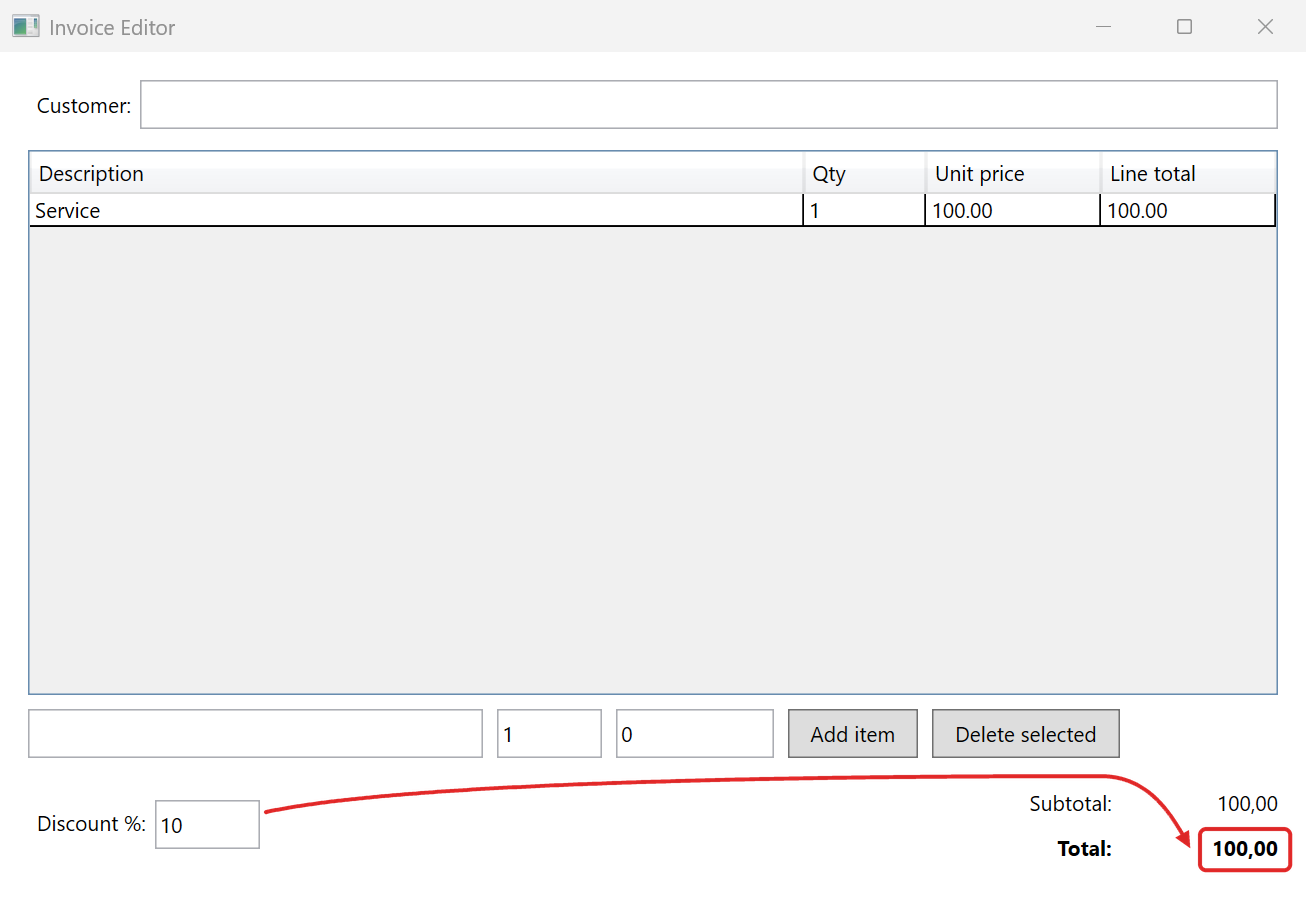
One of the three cards describes a bug. The InvoiceApp has a Discount % field, but the total ignores it. With one item of 100.00 and a discount of 10 the total stays at 100,00 (marked in red in the screenshot below).
The following card describes the bug and the expected result:
---
title: The total ignores the discount
state: New
category: Bug
---

The totals panel has a "Discount %" field. Typing a discount changes nothing:
the total always equals the subtotal.

**Acceptance criteria**

- With items worth 100.00 and a discount of 10, the total shows 90.00.
- An empty or non-numeric discount counts as 0, not as an error.
- The subtotal stays undiscounted.
Each acceptance criterion names a value to enter and a value to read back.
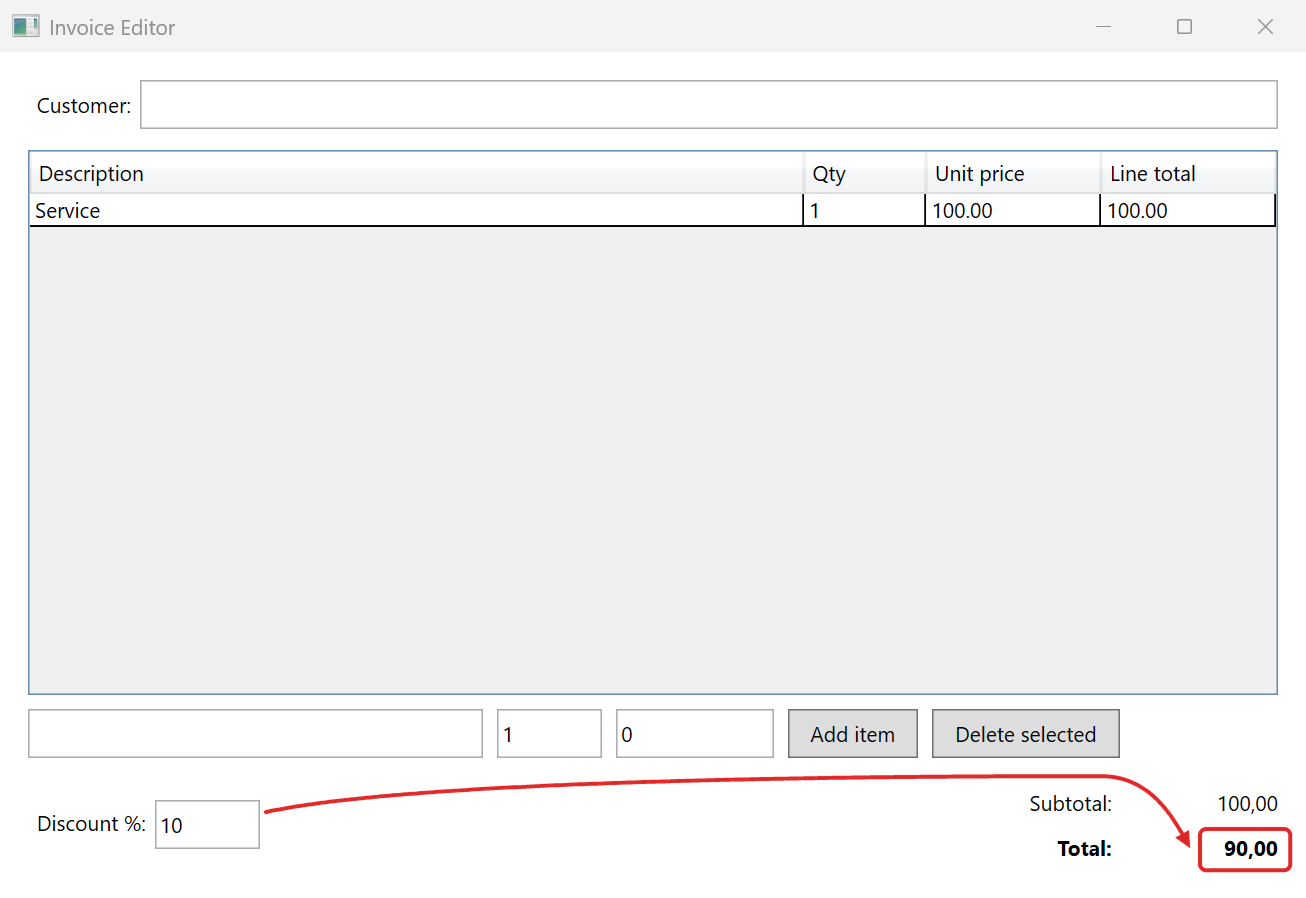
The agent first reproduced the bug with the two sample items. Then it changed the code, built the application again and checked the three criteria. The next screenshot shows the result. With the same values the total is now 90,00 (marked in red).
The following diff shows the change in a method called RecalculateTotals:
 SubtotalText.Text = subtotal.ToString("N2", CultureInfo.CurrentCulture);
-// NOTE: The discount is read but never applied on purpose - this is the bug the
-// first card describes, and the agent run fixes it.
-TotalText.Text = subtotal.ToString("N2", CultureInfo.CurrentCulture);
+// An empty or non-numeric discount counts as 0.
+var discountPercent = decimal.TryParse(DiscountTextBox.Text, NumberStyles.Number,
+    CultureInfo.CurrentCulture, out var d) ? d : 0m;
+var total = subtotal - subtotal * discountPercent / 100m;
+TotalText.Text = total.ToString("N2", CultureInfo.CurrentCulture);
The new code reads the discount with the culture of the machine and counts an empty or invalid value as 0. Then it subtracts the discount from the subtotal. The commit contains only MainWindow.xaml.cs, with the following message:
card: The total ignores the discount

RecalculateTotals now parses the Discount % box with the current culture and
subtracts that share from the subtotal; an empty or non-numeric value counts
as 0. The subtotal line is unchanged. Verified live through UI Automation:
with one item of 100.00 a discount of 10 shows total 90.00, an empty box and
"abc" both show 100.00 with no error dialog, and the subtotal stayed at
100.00 throughout.
The card is now “Done”. In the repository the tag article-2-run marks the state after this run. The main branch keeps the bug, so the card can run again.
The run also shows a limit. The InvoiceApp formats the totals with the German culture of the machine and the grid with English numbers. The card asks for 90.00, the agent read 90,00 and accepted it without a note.
This article does not introduce MCP or UI Automation in detail. There are other ways to let an agent see an application. A screenshot and a model with image input need no AutomationIds, but every step costs an image and values are read less exactly. For web applications Playwright offers an MCP server with the same kind of tools. UiMcpServer uses System.Windows.Automation, the managed UI Automation API of .NET. For applications with WinForms or Win32 controls, the library FlaUI with the newer COM interface of UI Automation is an alternative. Recorded scripts run faster and without a model, but they break when the user interface changes and cannot judge a result.
In the demo no human takes part between the card and the commit. A next version could add the following:
- a “Questions” state for unclear cards, with the questions and the answers in the card
- a “Review” state before the commit, with my feedback for a second round
- a check of the card without write access, before any code changes
- a project memory, in which the agent notes what it learned for the next card
- a Kanban board as a small web service
For questions and review the runner would continue the same Claude Code session with the –resume flag. So the agent would keep what it already knows about the application. Claude Code reads a CLAUDE.md in the repository at the start of every run. If the agent added what it learned there, for example that the totals use the German number format, the next card would start with this knowledge. These entries would need the same review as the code.
The Kanban board could show one column per state and start the runner for a card. For each run it would show the log, the diff and the screenshots and offer fields for answers and feedback. The cards would stay Markdown files in the repository, and the board would only read and write them. It could also work through the “New” column one card after another and send a notification when a card waits for me.
That’s it.
If you have questions feel free to contact me.
Links:
CardsToLoop on GitHub →
Model Context Protocol →
MCP C# SDK →
Claude Code, run programmatically →
Claude Code, MCP →
UI Automation overview →
FlaUI →